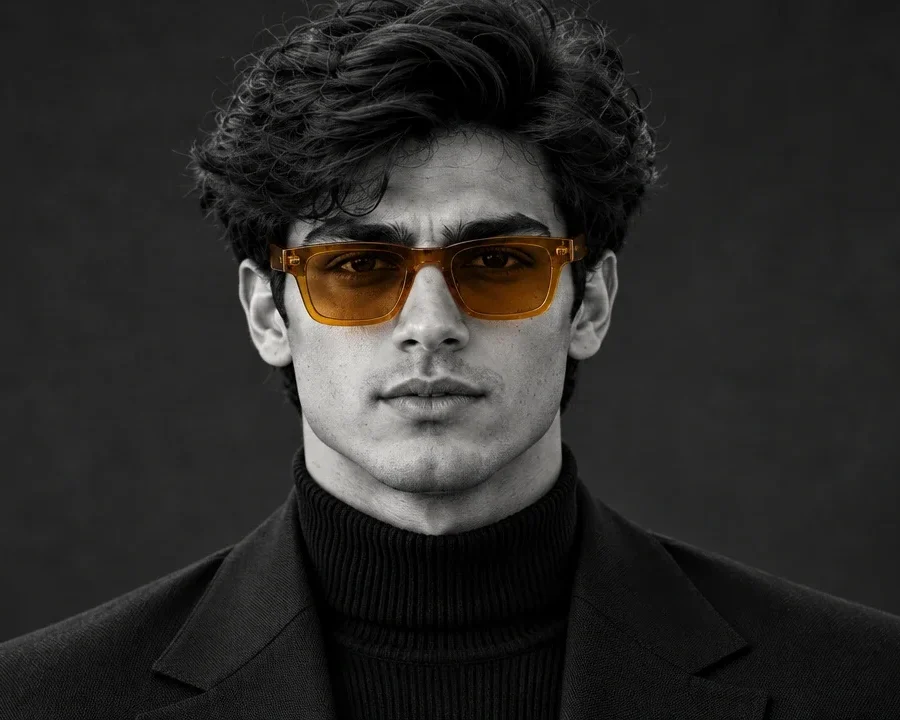
Selective color — where almost everything is monochrome except one deliberate splash of color — is one of the hardest effects to nail without professional editing software. This prompt handles it in a single generation: a stern, studio-lit black-and-white portrait where the only color in the entire frame is a pair of amber-tinted eyeglasses.
What this prompt creates
The output is a centered, chest-up, black-and-white studio portrait in vertical 4:5, with the subject facing the camera directly in a black ribbed turtleneck under a structured blazer. His expression is serious and authoritative, with slightly narrowed eyes and intense direct eye contact. The one deliberate exception to the monochrome treatment is a pair of amber-orange translucent rectangular eyeglasses, which stay in color against the otherwise fully grayscale image — skin, hair, clothing, and background all rendered in rich black-and-white tones. This is one of the more technically demanding prompts in the collection because it has to hold two contradictory instructions at once (full grayscale, but keep this one object in color), which is why it repeats the instruction twice in different words — a technique worth noting if you ever write your own selective-color prompt.
How to use this photo prompt
1. Copy the entire prompt text, including the repeated grayscale/color instructions. 2. Start a new chat in ChatGPT or Gemini. 3. Upload a clear, front-facing photo. 4. Paste the prompt and send. 5. If the glasses come out gray instead of amber, or if other elements pick up unwanted color, regenerate once or twice — selective-color effects are one of the trickier results to get consistently right.
Tips for a better result
- Use a bright, evenly lit reference photo; this prompt asks for sculpted facial shadows, and a clear source photo gives the tool a solid base to work from.
- If any other part of the image picks up stray color, add "strictly monochrome except the eyeglasses, no other colored elements" and regenerate.
- Try swapping the eyeglass tint description (e.g. to a red or blue tint) if you want a different color-splash variant — keep every other line unchanged.
- Crop your reference photo to a head-and-shoulders framing for the most accurate face match.
- If the expression looks too soft, reinforce it with "stern, unsmiling, direct eye contact" again.
- Generate at least twice; the amber tint intensity can shift slightly between attempts.
Who this prompt suits
A great pick for boys and men who want a striking, editorial black-and-white portrait with one unforgettable visual hook — perfect for a profile picture that gets remembered, a portfolio piece, or a bold print. It especially suits anyone who already wears statement eyewear.
More prompts like this
See more in the Boys category and the Black and White category, including the Studio Suit Backlit Portrait and the Noir Crow Alley Portrait. You may also like the Colored Gel Light Studio Portrait, the Mirror Fragment Studio, and the Train Window Portrait. Browse the full Prompts for Boys collection or return to the PromptSeva homepage.
What makes this style work
The selective-color effect works because the prompt names the exception twice, in two different places, rather than assuming the model will infer it from one mention — a useful trick anytime you need one instruction to override a broader rule. The lighting is described with direction and softness ("from the front and slightly above," "subtle fill light on the darker side"), which sculpts real facial shadow rather than flattening the face. And the expression is spelled out precisely — "serious, stern, calm, and authoritative" — instead of left generic, which is what gives this portrait its distinct mood. If you're experimenting with your own selective-color prompt, state the color exception at least twice and describe the expression in specific, not generic, terms.