Skip to content

Blush Pink Saree Selfie AI Photo Prompt for Girls

3 copies
Blush Pink Saree Selfie AI Photo Prompt for Girls

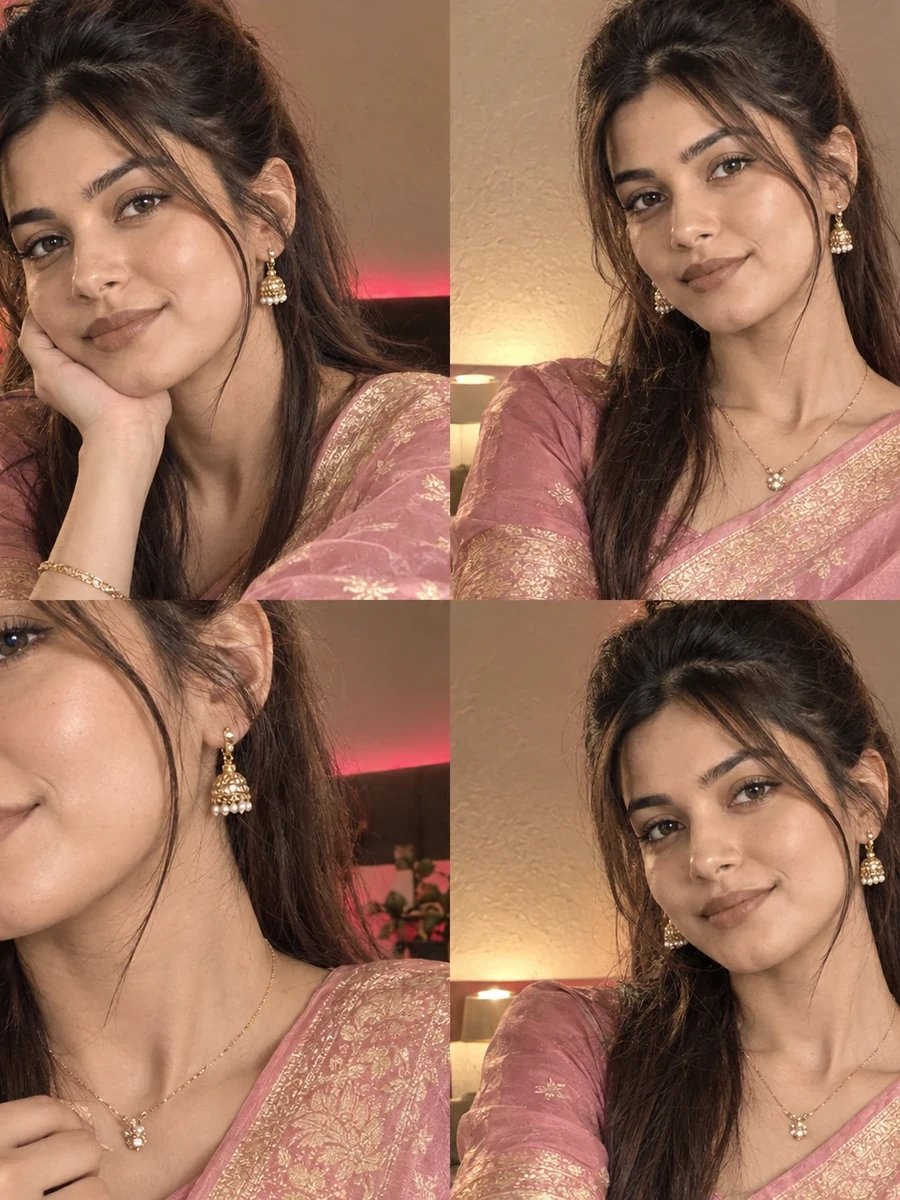
Free saree selfie AI prompt: a 2x2 iPhone-style selfie collage in a blush pink Banarasi silk saree. Works with ChatGPT, Gemini. Copy & paste.

The prompt

FACIAL IDENTITY — ABSOLUTE PRIORITY
Keep the uploaded woman's face completely unchanged across all four frames: same bone structure, same eyes, same nose, same lips, same skin tone and texture. Do not slim, smooth, lighten or beautify the face in any way. 100% face match to reference photo in every frame.

SUBJECT & STYLING
A woman in a blush pink Banarasi silk saree with gold zari borders, styled with delicate jewelry. Composed as a 2x2 grid of four separate iPhone-style selfies: one chin-on-hand resting close-up, one direct front-facing frame, one close-up focused on jewelry detail, and one natural candid half-smile frame.

SCENE
An indoor setting with cream-textured walls, warm ambient room lighting with subtle pink-red LED accent lighting.

LIGHTING & CAMERA
Warm indoor lighting mixed with soft pink-red LED accents, natural iPhone front-camera flash creating dimensional facial lighting in close-up frames. Shot as four separate 1:1 square frames arranged in a 2x2 grid, natural skin texture preserved in each.

NEGATIVE REQUIREMENTS
No face swapping, no plastic skin, no over-saturation, no extra fingers, no distorted jewelry, no AI-perfect symmetry, no text or watermarks, no inconsistency between the four frames. Do not change facial features, skin tone, or face shape from reference photo in any frame.

How to use this prompt

  1. Open ChatGPT, Gemini or any AI image tool you like.
  2. Upload a clear, front-facing photo of yourself.
  3. Tap Copy prompt above and paste it into the chat.
  4. Send it, then wait for the image to generate.
  5. Ask for small tweaks — lighting, outfit, background — until it looks right.

What this prompt creates

This free saree selfie prompt turns your photo into a 2x2 grid of four coordinated iPhone-style selfies — a blush pink Banarasi silk saree with gold zari borders, shot in warm indoor lighting with subtle pink-red LED accents. This format has become a popular aesthetic for saree photos precisely because it mimics how people actually take selfies in real life: a mix of close-up angles, jewelry details, and candid half-smiles, rather than one formal, single portrait.

What makes a four-frame grid prompt harder to get right than a single image is consistency — the same face, the same outfit, the same lighting mood needs to hold across all four frames, or the collage looks obviously artificial. This prompt is written to reinforce that consistency explicitly, treating the four frames as variations of the same real photoshoot moment rather than four independent generations.

How to Use This Prompt

1. Copy the full prompt above. 2. Open ChatGPT, Gemini, or any AI image tool that supports image uploads. 3. Upload one clear, front-facing photo of yourself. 4. Paste the prompt exactly as written and send it. 5. The AI will generate a 2x2 grid of four selfie-style frames using your actual face, styled in the blush pink saree described above. 6. If any single frame looks inconsistent with the others, ask the AI to "regenerate frame [number] to match the same face, lighting, and saree styling as the other three frames."

This prompt is the first in a five-part saree selfie collection — try the maroon or peacock teal variants next for a coordinated set of festive selfie grids.

Why Face Preservation Matters Here

Multi-frame collages multiply the risk of facial drift — if even one of the four frames looks noticeably different from your actual face, the whole grid feels off, since viewers naturally compare the frames against each other. This prompt's facial identity instructions explicitly apply "across all four frames," which is necessary because some AI tools treat each frame in a grid as a semi-independent generation and can introduce small inconsistencies without that instruction.

If you notice one frame looking less accurate than the others, it's more effective to ask for that specific frame to be corrected rather than regenerating the whole grid — for example, "only the jewelry close-up frame needs adjustment, keep the other three frames as they are."

Who This Prompt Works Best For

This blush pink grid is a strong choice for anyone who wants their saree photos to look like a real, spontaneous selfie session rather than a formal studio portrait — it works well for Instagram carousels, WhatsApp status updates around a festival, or a wedding guest look shared casually rather than posted as a single formal image. The soft, warm palette and iPhone-style framing also make it a good opener if you're generating multiple saree grids in one sitting, since the lighter tone provides a gentle contrast to the deeper maroon and emerald options later in the collection.

It's a less suitable pick if you need one single, high-impact image rather than a four-part collage — the visual appeal here comes specifically from the grid format and the variety across frames, so if you only need one photo, a single-frame saree prompt will be a more direct fit.

Common Mistakes to Avoid

The most common mistake with any grid prompt is uploading a reference photo that's too tightly cropped — since the AI needs to generate four different framings (chin-on-hand, direct front-facing, jewelry close-up, candid half-smile) from one source image, a reference photo that only shows your face from the nose up limits how well it can extrapolate the wider frames. Another frequent issue is expecting all four frames to render in a single attempt without needing any follow-up; it's normal and expected to need at least one round of frame-specific correction, especially for the jewelry close-up, which asks the AI to render fine detail it doesn't have direct reference for. Finally, avoid reference photos with strong colored lighting already on your face (a green or blue tinted room, for example) since that can conflict with the requested warm pink-red LED accent tone and create an odd double-lighting effect in the final grid.

Tips for Best Results

  • Use a well-lit, front-facing reference photo — grid-style prompts rely heavily on the AI extrapolating your face from multiple angles, so a clear starting reference matters more here than in single-frame prompts.
  • If the LED accent lighting looks too intense, ask for "more subtle pink-red LED accents, warm tones should still dominate" in a follow-up.
  • Try both ChatGPT and Gemini — multi-frame grid consistency is one of the more noticeable differentiators between AI tools.
  • For jewelry-focused frames, mention "sharp, detailed focus on jewelry texture and reflections" if that frame looks too soft.
  • If you're building a full saree selfie set, this blush pink grid works well as an opener alongside the deeper maroon and emerald tones later in the collection.
Frequently asked questions

What does the Blush Pink Saree Selfie AI Photo Prompt for Girls actually create?

It turns your uploaded photo into a 2x2 iPhone-style selfie collage in a blush pink Banarasi silk saree, while keeping your face exactly as it is in the original photo.

Is this prompt free, and which AI tool do I use it with?

Yes, it is completely free — copy the prompt as-is and paste it into Gemini, ChatGPT, or any AI photo tool that accepts a reference image with a text prompt.

Will this saree look match my own face?

Yes — the prompt locks your facial identity first, so only the outfit, pose, and background change for you; your bone structure, eyes, and skin tone stay untouched.

More prompt collections

Aesthetic AI Photo Prompts Beach AI Photo Prompts Bike AI Photo Prompts Birthday AI Photo Prompts Black and White AI Photo Prompts Boys AI Photo Prompts Casual AI Photo Prompts Cinematic AI Photo Prompts Couple AI Photo Prompts Evening AI Photo Prompts Festival AI Photo Prompts Festive AI Photo Prompts Girls AI Photo Prompts Kurti AI Photo Prompts Lehenga AI Photo Prompts Lifestyle AI Photo Prompts Luxury AI Photo Prompts Male AI Photo Prompts Men AI Photo Prompts Navratri AI Photo Prompts Outdoor AI Photo Prompts Pastel AI Photo Prompts Portrait AI Photo Prompts Rajasthan AI Photo Prompts Selfie AI Photo Prompts Summer AI Photo Prompts Travel AI Photo Prompts Vintage AI Photo Prompts Wedding AI Photo Prompts Women AI Photo Prompts Aesthetic Saree AI Photo Prompts Bike Boys Bullet AI Photo Prompts Bike Couple AI Photo Prompts Bike Gemini 2026 AI Photo Prompts Bike Luxury AI Photo Prompts Bike Man AI Photo Prompts Boys AI Photo Prompts Boys Autumn AI Photo Prompts Boys College Stylish AI Photo Prompts Boys Copy Paste Trending AI Photo Prompts Boys Dubai 2026 AI Photo Prompts Boys Instagram Editing AI Photo Prompts Boys Instagram Viral AI Photo Prompts Boys Lifestyle AI Photo Prompts Boys Luxury Yacht AI Photo Prompts Boys Museum AI Photo Prompts Boys Nano Banana AI Photo Prompts Boys Prompt Generator Boys Stylish Men AI Photo Prompts Boys Trending Looks AI Photo Prompts Boys Viral Editing AI Photo Prompts Chatgpt Saree AI Photo Prompts Couple AI Photo Prompts Couple Prompts Couple Beach AI Photo Prompts Couple Chatgpt Instagram 2026 AI Photo Prompts Couple Double Exposure AI Photo Prompts Couple Gemini Editing AI Photo Prompts Couple Gemini Romantic AI Photo Prompts Couple Indian Chatgpt Palace AI Photo Prompts Couple Indian Gemini Saree AI Photo Prompts Couple Onam AI Photo Prompts Couple Prompts Couple Traditional Saree Kurta AI Photo Prompts Couple Wedding AI Photo Prompts Girls AI Photo Prompts Girls Beach AI Photo Prompts Girls Flower Field AI Photo Prompts Girls Kurti AI Photo Prompts Girls Lehenga AI Photo Prompts Girls Mirror Selfie AI Photo Prompts Girls Retro Saree AI Photo Prompts Girls Sharara AI Photo Prompts Girls Summer Outfit AI Photo Prompts Girls Vacation AI Photo Prompts Kurti Denim AI Photo Prompts Luxury Lifestyle AI Photo Prompts Navratri AI Photo Prompts Prompts for Boys Prompts for Girls Prompts For Boys Prompts For Girls Rajasthan Travel AI Photo Prompts Summer Stroll AI Photo Prompts