प्रॉम्प्ट
FACIAL IDENTITY — ABSOLUTE PRIORITY
Keep the uploaded person's face completely unchanged: same bone structure, same eyes, same nose, same lips, same skin tone and texture. Do not slim, smooth, beautify, reconstruct, or reinterpret the face. Do not turn them into a celebrity or generic model. 100% face match to the reference photo — only the outfit, pose, background, and gaze direction change, never the face itself.

CAMERA-FACING ANGLE & DIRECT EYE CONTACT (critical)
Face stays fully forward and centered toward the camera, head level, not tilted or turned away — even during an action pose (riding, walking, holding something). The action comes from the hands, shoulders, and body only, never from turning the head or face.

Both people's pupils are centered and looking straight into the camera lens — direct eye contact with the viewer, like a portrait photographer's direct-gaze shot. Not gazing to the side, not looking past the camera into the distance, not unfocused, not cross-eyed. Even if the uploaded reference photo shows the eyes looking elsewhere (to the side, downward, at each other), redirect the gaze so both people look straight into the camera in the final result — this is the one detail that is allowed to differ from the reference photo.

HAIRSTYLE
Hair is neatly styled and groomed for the scene — flyaways smoothed down, settled, not messy or windblown. Applies to both the man and the woman.

MAKEUP (for female subjects)
Light, natural, everyday makeup — subtle base, softly defined brows, a natural lip tint, and a healthy glow. For male subjects: neatly groomed hair and clean natural skin texture, no visible makeup.

CLEAR SKIN (both subjects)
Both people's skin is clear and even-toned — pimples, acne, blemishes, and dark spots are smoothed away naturally, while keeping real, natural skin texture (visible pores, no plastic or airbrushed look). This applies equally to the man and the woman.

IMPORTANT: This grooming, makeup, skin-clearing, and gaze-redirect enhancement must never change face shape, eyes, nose, lips, or bone structure — it only enhances the existing face and gaze direction, it does not alter identity.

FACIAL IDENTITY — ABSOLUTE PRIORITY
Keep the uploaded person's face completely unchanged: same bone structure, same eyes, same nose, same lips, same skin tone and texture. Do not slim, smooth, beautify, reconstruct, or reinterpret the face. Do not turn them into a celebrity or generic model. 100% face match to the reference photo — only the outfit, pose, background, and gaze direction change, never the face itself.

CAMERA-FACING ANGLE & DIRECT EYE CONTACT (critical)
Face stays fully forward and centered toward the camera, head level, not tilted or turned away — even during an action pose (riding, walking, holding something). The action comes from the hands, shoulders, and body only, never from turning the head or face.

Both people's pupils are centered and looking straight into the camera lens — direct eye contact with the viewer, like a portrait photographer's direct-gaze shot. Not gazing to the side, not looking past the camera into the distance, not unfocused, not cross-eyed. Even if the uploaded reference photo shows the eyes looking elsewhere (to the side, downward, at each other), redirect the gaze so both people look straight into the camera in the final result — this is the one detail that is allowed to differ from the reference photo.

HAIRSTYLE
Hair is neatly styled and groomed for the scene — flyaways smoothed down, settled, not messy or windblown. Applies to both the man and the woman.

MAKEUP (for female subjects)
Light, natural, everyday makeup — subtle base, softly defined brows, a natural lip tint, and a healthy glow. For male subjects: neatly groomed hair and clean natural skin texture, no visible makeup.

CLEAR SKIN (both subjects)
Both people's skin is clear and even-toned — pimples, acne, blemishes, and dark spots are smoothed away naturally, while keeping real, natural skin texture (visible pores, no plastic or airbrushed look). This applies equally to the man and the woman.

IMPORTANT: This grooming, makeup, skin-clearing, and gaze-redirect enhancement must never change face shape, eyes, nose, lips, or bone structure — it only enhances the existing face and gaze direction, it does not alter identity.

FACIAL IDENTITY — ABSOLUTE PRIORITY
Keep both uploaded faces completely unchanged: same bone structure, same eyes, same nose, same lips, same skin tone and texture for each person. Do not slim, smooth, lighten or beautify either face in any way. 100% face match to reference photos for both individuals.

SUBJECT & STYLING
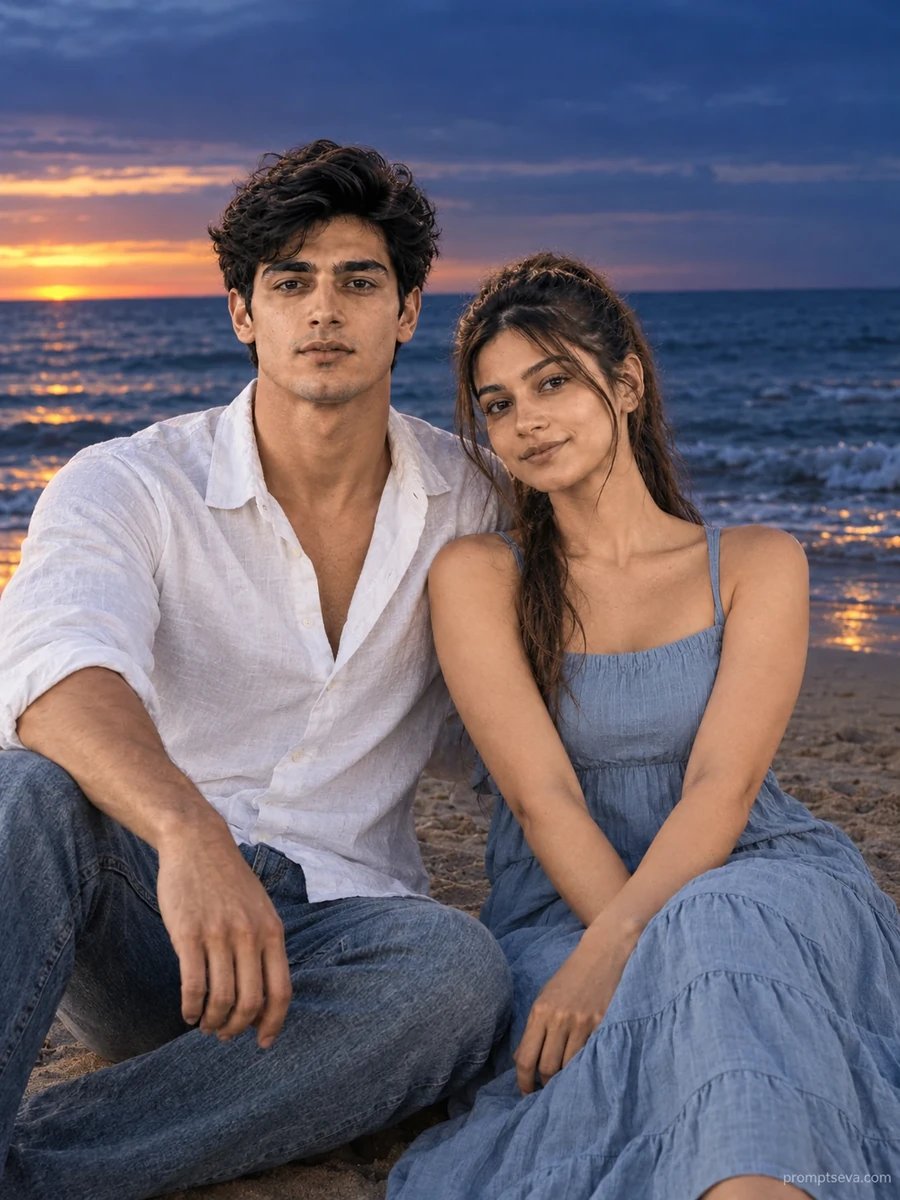
A couple seated together on the sand facing the ocean — the woman in a dusty sky-blue tiered cotton sleeveless midi dress, the man in a white linen shirt and stone-washed blue denim. Close together, calm and content expressions, both facing the camera.

SCENE
An Atlantic Ocean shoreline at deep blue dusk, gentle waves visible in the fading light.

LIGHTING & CAMERA
Blue hour transition light — warm amber glow low at the waterline blending into rich indigo above, cool ambient tones overall. Shot at 3:4 vertical ratio, 90mm equivalent focal length, cinematic composition.

NEGATIVE REQUIREMENTS
No face swapping, no plastic skin, no over-saturation, no extra fingers, no distorted wave patterns, no AI-perfect symmetry, no text or watermarks. Do not change facial features, skin tone, or face shape from either reference photo.
यह प्रॉम्प्ट क्या बनाता है
This free couple beach prompt turns two photos into a moody, cinematic blue-hour portrait — sitting together on the sand at dusk, a dusty sky-blue midi dress against a white linen shirt and stone-washed denim, framed by the gentle color transition of an Atlantic shoreline as day turns to night. The lighting is the standout feature of this scene: a warm amber glow lingering low at the waterline, fading upward into rich indigo sky, creating a natural gradient that most other prompts in this collection don't attempt.
The 90mm focal length compresses the background slightly compared to the wider lenses used elsewhere in the collection, pulling the couple and the darkening ocean a little closer together visually. Combined with the calm, content expressions and closer seated framing, the result leans more romantic and reflective than the playful energy of the piggyback prompt or the candid motion of the sand-writing scene.
How to Use This Prompt
1. Copy the full prompt above. 2. Open ChatGPT, Gemini, or any AI image tool that supports image uploads. 3. Upload two clear, front-facing photos — one for each person. 4. Paste the prompt exactly as written and send it. 5. The AI will generate a photorealistic dusk beach portrait using both actual faces, lit by the blue hour color transition. 6. If the lighting looks too dark to see facial detail clearly, ask the AI to "keep both faces clearly lit and visible even within the dusk lighting."
As the closing image in the couple beach collection, this dusk portrait provides a strong contrast to the bright daylight prompts earlier in the set — together they cover a full range of moods from playful midday energy to quiet evening reflection.
Why Face Preservation Matters Here
Low-light and mixed-color lighting conditions, like the blue hour transition described in this prompt, are one of the trickier scenarios for AI face accuracy — warm and cool light sources hitting the face from different angles can shift how skin tone and features appear, and some models compensate by altering the underlying face rather than just adjusting the lighting on top of it. This prompt's facial identity instructions are meant to keep that distinction clear: the lighting should change, the face underneath should not.
If you find that the dusk lighting is affecting facial accuracy — skin tone shifting too far warm or cool, features looking softened in the dim light — add a follow-up like "apply the dusk lighting as an effect on top of the face, but keep the underlying facial structure and skin tone matched to the uploaded photos."
Who This Prompt Works Best For
This blue-hour portrait suits couples who want a more romantic, reflective mood than a typical bright beach photo — it works especially well as an anniversary image, a moody engagement announcement, or the closing image in a photo set that needs an emotional, quieter note to end on. The cinematic color grading and compressed 90mm framing also make it a good candidate for a printed keepsake or a wedding slideshow closing frame, where a calmer, more atmospheric tone fits better than a bright midday shot.
It's not the right pick if you need maximum facial clarity or a bright, evenly-lit result — the dusk lighting is intentionally moody and lower-contrast in places, so if legibility of facial detail is the top priority, one of the daylight prompts in this collection will serve that better.
Common Mistakes to Avoid
The most common issue with this prompt is uploading reference photos that are too dark or low-contrast to begin with — since the scene itself introduces dim, mixed-color lighting, starting from an already poorly lit reference photo leaves the AI with very little accurate information about your actual features to preserve through the lighting change. Another mistake is expecting the amber-to-indigo gradient to look identical every time; blue hour lighting is inherently variable, so treat the first result as a starting point and use follow-up requests to fine-tune the gradient's position and intensity. Finally, avoid pairing this prompt with reference photos that have strong artificial lighting (indoor flash, phone-screen glow) — the naturalistic dusk color transition works best when the AI isn't also trying to reconcile an unrelated artificial light source from the source photo.
Tips for Best Results
- Use reference photos with clear, well-lit faces — this gives the AI the clean baseline it needs before applying the more complex blue-hour lighting.
- If the amber-to-indigo gradient looks too abrupt, ask for "a smoother, more gradual color transition across the sky" in a follow-up.
- Try both ChatGPT and Gemini — mixed warm/cool lighting scenes like this often show the clearest differences in rendering quality between tools.
- For a slightly brighter alternative, you can ask for "golden hour instead of blue hour" while keeping the rest of the prompt unchanged.
- If you're building the full couple beach set, this dusk portrait works best as a closing or standalone image rather than paired with the brighter midday prompts, since the lighting mood is quite different.