Skip to content

Peacock Teal Saree Window AI Photo Prompt for Girls

4 copies
Peacock Teal Saree Window AI Photo Prompt for Girls

Free saree AI prompt: peacock teal tissue silk saree lit by soft window daylight through sheer curtains. Works with ChatGPT, Gemini. Copy & paste.

The prompt

FACIAL IDENTITY — ABSOLUTE PRIORITY
Keep the uploaded woman's face completely unchanged across all four frames: same bone structure, same eyes, same nose, same lips, same skin tone and texture. Do not slim, smooth, lighten or beautify the face in any way. 100% face match to reference photo in every frame.

SUBJECT & STYLING
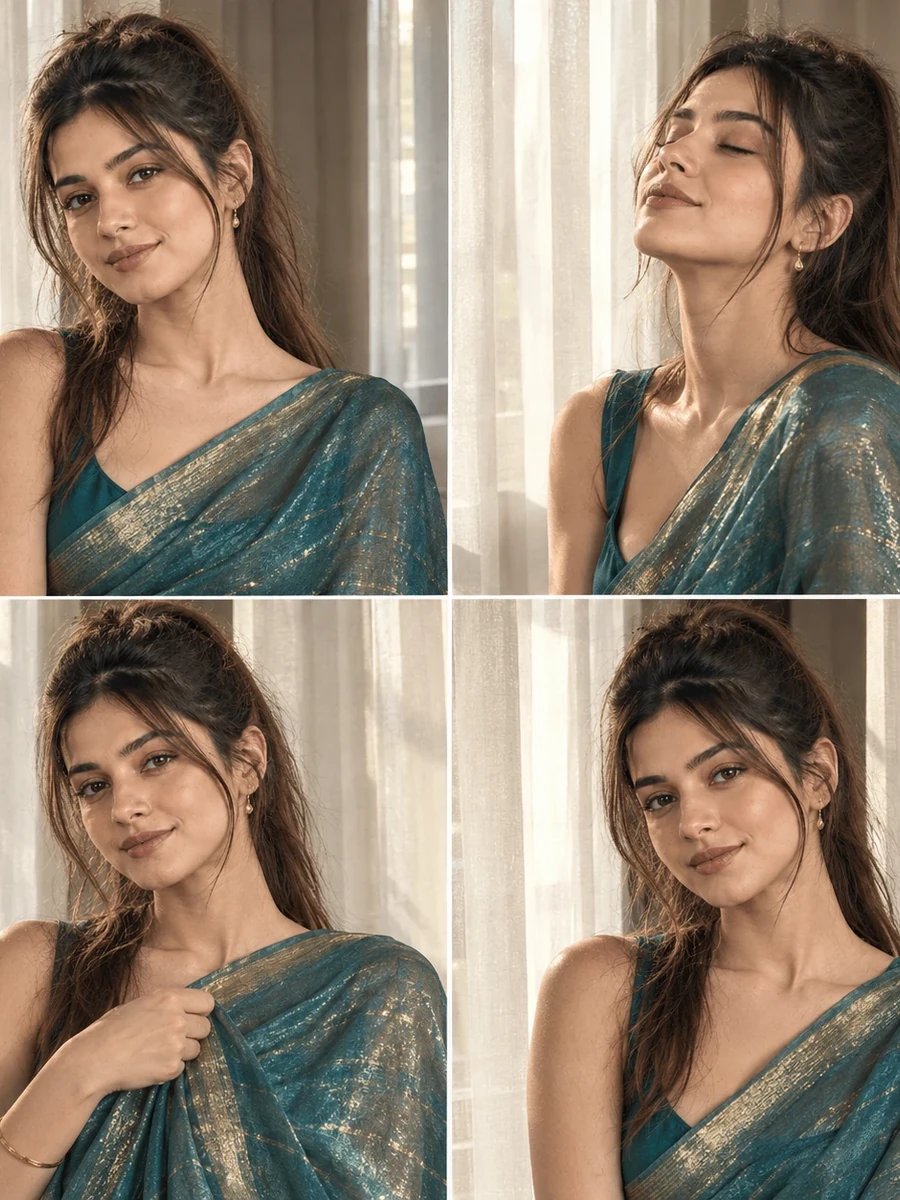
A woman in a peacock teal tissue silk saree with gold threading, styled with minimal jewelry to let the fabric's shimmer stand out. Composed as a four-frame grid: one three-quarter window-facing pose, one eyes-closed upward tilt toward the light, one frame holding the pallu, and one direct eye-contact frame.

SCENE
Near a window with sheer curtains, soft diffused afternoon sunlight filtering through the fabric.

LIGHTING & CAMERA
Diffused afternoon sunlight through sheer curtains, creating soft directional window light with a magazine-cover quality and visible iridescent shimmer on the tissue silk fabric. Shot as four separate 1:1 square frames arranged in a 2x2 grid.

NEGATIVE REQUIREMENTS
No face swapping, no plastic skin, no over-saturation, no extra fingers, no distorted curtain fabric, no AI-perfect symmetry, no text or watermarks, no inconsistency between the four frames. Do not change facial features, skin tone, or face shape from reference photo in any frame.

How to use this prompt

  1. Open ChatGPT, Gemini or any AI image tool you like.
  2. Upload a clear, front-facing photo of yourself.
  3. Tap Copy prompt above and paste it into the chat.
  4. Send it, then wait for the image to generate.
  5. Ask for small tweaks — lighting, outfit, background — until it looks right.

What this prompt creates

This free saree prompt turns your photo into a soft, magazine-style four-frame grid — a peacock teal tissue silk saree with gold threading, lit by diffused afternoon sunlight filtering through sheer curtains. Unlike the warmer, LED-accented grids elsewhere in this collection, this one relies entirely on natural window light, which gives it a calmer, more editorial feel closer to a fashion magazine cover than a typical festive selfie.

The eyes-closed, upward-tilted frame is a distinctive pose choice here — it's a classic "basking in the light" gesture that works particularly well with soft window lighting, since it draws attention to how the light falls across the face rather than relying on direct eye contact to hold the frame's interest. Combined with the tissue silk's natural shimmer, this prompt leans into texture and light quality more than the other grids in the collection.

How to Use This Prompt

1. Copy the full prompt above. 2. Open ChatGPT, Gemini, or any AI image tool that supports image uploads. 3. Upload one clear, front-facing photo of yourself. 4. Paste the prompt exactly as written and send it. 5. The AI will generate a 2x2 grid of four window-lit frames using your actual face, styled in the peacock teal saree described above. 6. If the fabric shimmer looks too flat, ask the AI to "increase the visible iridescent shimmer and light reflection on the tissue silk fabric."

This softer, natural-light aesthetic pairs well with the lavender or emerald evening prompts from the ChatGPT saree collection if you want a wider variety of lighting moods across your saree photo sets.

Why Face Preservation Matters Here

The eyes-closed frame in this grid presents a unique challenge: with the eyes closed, the AI has less of the face's most identity-defining feature visible, and needs to rely more heavily on bone structure, nose shape, lips, and skin tone to maintain accuracy. This prompt's facial identity instructions matter especially in this frame, since it's easier for a model to drift toward a generic "peaceful expression" face when the eyes aren't providing a strong reference anchor.

If the eyes-closed frame looks less recognizable than the others, add a note like "even with eyes closed, keep the eyelid shape, brow structure, and overall face shape matched to the reference photo."

Who This Prompt Works Best For

This window-light grid is particularly well suited to anyone who wants a calmer, more editorial mood than typical festive selfies — bridal shower or mehendi content, a personal lookbook post, or simply a saree photo set meant to feel more like a fashion spread than a phone selfie. Because it relies on natural light rather than LED accents, it also tends to look more timeless and less trend-dependent than the warmer, more stylized grids elsewhere in the collection, making it a good choice if you want photos that won't feel dated in a year or two.

It's not the best option if your priority is a high-energy, celebratory feel — the soft window light and eyes-closed contemplative pose lean quiet and reflective rather than festive, so pair it with the maroon or mustard grids if you need a livelier tone somewhere in your set.

Common Mistakes to Avoid

The most common mistake here is uploading a reference photo taken under strong artificial lighting (fluorescent office light, colored LED) and expecting it to blend seamlessly with soft natural window light — the color temperature mismatch can create a visible seam between your face and the scene, so a reference photo taken in daylight or neutral indoor light works best. Another frequent issue is treating the eyes-closed frame as a throwaway shot; because it removes the eyes as a reference point, it's actually the frame most likely to need a correction request, so review it carefully rather than assuming it matched automatically. Lastly, avoid asking for too much shimmer intensity on the tissue silk in a single request — overcorrecting can push the fabric into an unnatural, almost metallic look, so adjust incrementally and check each result before requesting more.

Tips for Best Results

  • Provide a reference photo with your eyes open and clearly visible — even for the eyes-closed frame, the AI needs a strong baseline reference to extrapolate from.
  • If the window light looks too harsh or too soft, specify "diffused window light, soft but with clear directional shadow on one side of the face" in a follow-up.
  • Try both ChatGPT and Gemini — soft natural window lighting is a good test of which tool renders more realistic, editorial-quality light falloff.
  • For a stronger shimmer effect, mention "tissue silk with visible iridescent color shift depending on light angle" if the fabric looks too matte.
  • If you're building the full aesthetic saree collection, this window-light grid works well as a calmer midpoint between the warmer maroon grid and the more dramatic red festive portrait later in the set.
Frequently asked questions

What does the Peacock Teal Saree Window AI Photo Prompt for Girls actually create?

It turns your uploaded photo into peacock teal tissue silk saree lit by soft window daylight through sheer curtains, while keeping your face exactly as it is in the original photo.

Is this prompt free, and which AI tool do I use it with?

Yes, it is completely free — copy the prompt as-is and paste it into Gemini, ChatGPT, or any AI photo tool that accepts a reference image with a text prompt.

Will this saree look match my own face?

Yes — the prompt locks your facial identity first, so only the outfit, pose, and background change for you; your bone structure, eyes, and skin tone stay untouched.

More prompt collections

Aesthetic AI Photo Prompts Beach AI Photo Prompts Bike AI Photo Prompts Birthday AI Photo Prompts Black and White AI Photo Prompts Boys AI Photo Prompts Casual AI Photo Prompts Cinematic AI Photo Prompts Couple AI Photo Prompts Evening AI Photo Prompts Festival AI Photo Prompts Festive AI Photo Prompts Girls AI Photo Prompts Kurti AI Photo Prompts Lehenga AI Photo Prompts Lifestyle AI Photo Prompts Luxury AI Photo Prompts Male AI Photo Prompts Men AI Photo Prompts Navratri AI Photo Prompts Outdoor AI Photo Prompts Pastel AI Photo Prompts Portrait AI Photo Prompts Rajasthan AI Photo Prompts Selfie AI Photo Prompts Summer AI Photo Prompts Travel AI Photo Prompts Vintage AI Photo Prompts Wedding AI Photo Prompts Women AI Photo Prompts Aesthetic Saree AI Photo Prompts Bike Boys Bullet AI Photo Prompts Bike Couple AI Photo Prompts Bike Gemini 2026 AI Photo Prompts Bike Luxury AI Photo Prompts Bike Man AI Photo Prompts Boys AI Photo Prompts Boys Autumn AI Photo Prompts Boys College Stylish AI Photo Prompts Boys Copy Paste Trending AI Photo Prompts Boys Dubai 2026 AI Photo Prompts Boys Instagram Editing AI Photo Prompts Boys Instagram Viral AI Photo Prompts Boys Lifestyle AI Photo Prompts Boys Luxury Yacht AI Photo Prompts Boys Museum AI Photo Prompts Boys Nano Banana AI Photo Prompts Boys Prompt Generator Boys Stylish Men AI Photo Prompts Boys Trending Looks AI Photo Prompts Boys Viral Editing AI Photo Prompts Chatgpt Saree AI Photo Prompts Couple AI Photo Prompts Couple Prompts Couple Beach AI Photo Prompts Couple Chatgpt Instagram 2026 AI Photo Prompts Couple Double Exposure AI Photo Prompts Couple Gemini Editing AI Photo Prompts Couple Gemini Romantic AI Photo Prompts Couple Indian Chatgpt Palace AI Photo Prompts Couple Indian Gemini Saree AI Photo Prompts Couple Onam AI Photo Prompts Couple Prompts Couple Traditional Saree Kurta AI Photo Prompts Couple Wedding AI Photo Prompts Girls AI Photo Prompts Girls Beach AI Photo Prompts Girls Flower Field AI Photo Prompts Girls Kurti AI Photo Prompts Girls Lehenga AI Photo Prompts Girls Mirror Selfie AI Photo Prompts Girls Retro Saree AI Photo Prompts Girls Sharara AI Photo Prompts Girls Summer Outfit AI Photo Prompts Girls Vacation AI Photo Prompts Kurti Denim AI Photo Prompts Luxury Lifestyle AI Photo Prompts Navratri AI Photo Prompts Prompts for Boys Prompts for Girls Prompts For Boys Prompts For Girls Rajasthan Travel AI Photo Prompts Summer Stroll AI Photo Prompts