
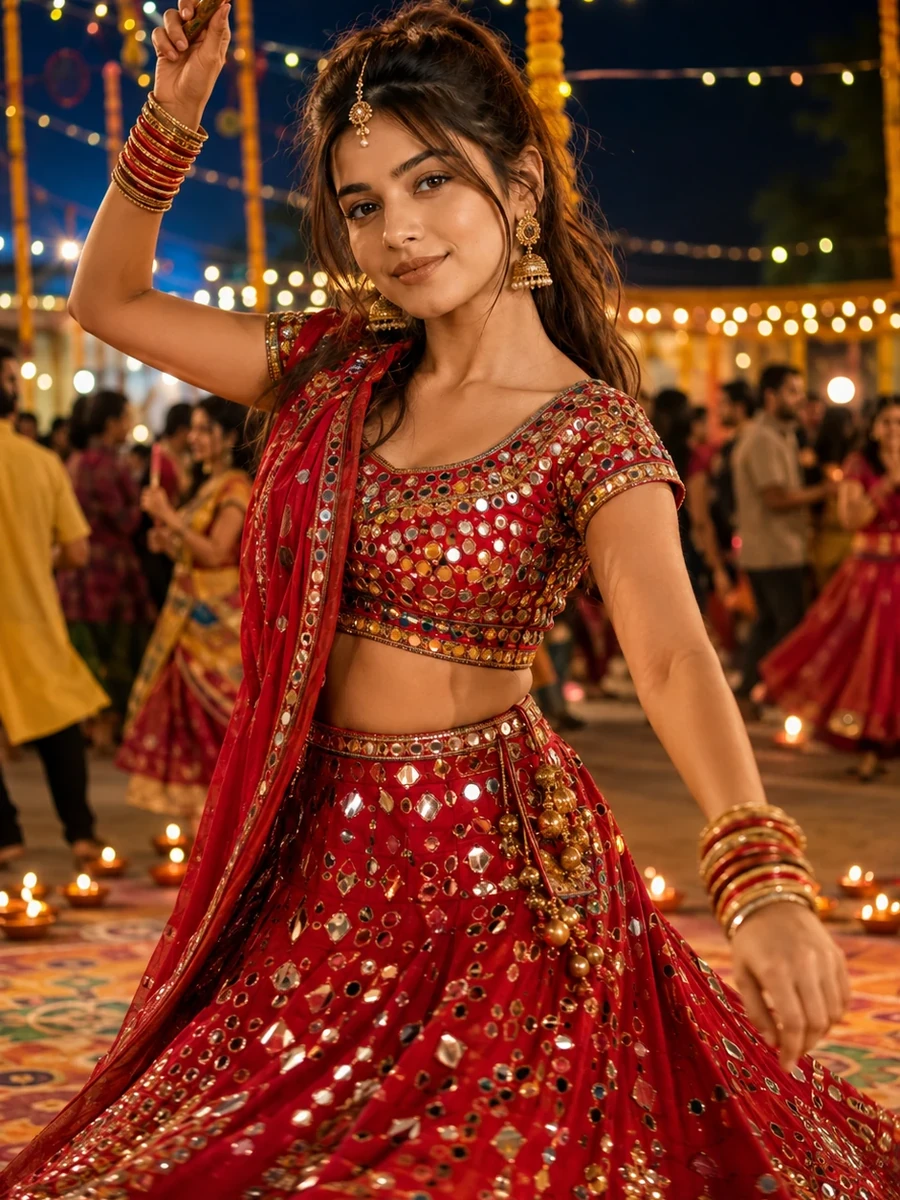
This free Navratri prompt turns an ordinary photo into a twirling Garba night portrait — a young woman in a vibrant crimson and gold mirror-work Chaniya Choli, caught mid-spin under strings of fairy lights and rows of glowing diyas. The scene captures the pure joy of Navratri nights: swirling skirts, jhumka earrings catching the light, stacked bangles on both wrists, and the warm golden glow of festival lamps set against a cool night sky. A faint rangoli pattern on the ground and softly blurred dancers in the background keep the focus entirely on the subject without making the scene feel empty or staged.
What makes this prompt work as a genuine festival photo rather than a static costume shot is the motion. The mid-twirl pose, the raised dandiya stick, and the slight motion blur specified on the flaring skirt all work together to suggest a real moment captured mid-dance, not a posed studio portrait. The prompt is deliberately written so that the face stays crisp and sharp even while everything around it — the skirt, the dupatta, the surrounding lights — carries a sense of movement. That contrast between a sharp face and a blurred, swirling skirt is exactly what real festival photography looks like when a photographer freezes a dancer mid-motion.
How to Use This Prompt
1. Copy the full prompt above. 2. Open ChatGPT, Gemini, or any AI image tool that supports image uploads. 3. Upload one clear, front-facing photo of yourself, ideally with even lighting and your face fully visible. 4. Paste the prompt exactly as written and send it. 5. The AI will generate a photorealistic Navratri Garba portrait using your actual face, styled in the crimson and gold Chaniya Choli described above. 6. If the twirl motion looks too extreme or the skirt shape looks unnatural, ask the AI to "keep the twirl pose natural and physically plausible, with realistic fabric movement in the flaring skirt."
This prompt pairs well with the Kediyu boy Garba portrait from the same collection if you want a coordinated pair of Navratri images, or with the couple diya glow portrait if you're generating a set for two people together.
Why Face Preservation Matters Here
A mid-twirl pose introduces genuine motion into the hair, skirt, and dupatta, and it's easy for an AI model to let that motion blur bleed into the face itself if the prompt doesn't explicitly separate the two. This prompt's facial identity instructions are written to keep your bone structure, eyes, nose, lips, and skin tone locked in place as a sharp, fixed reference point, even as the rest of the image captures the spinning energy of the dance. The twirl should read clearly in the fabric and hair — not in a softened or altered face.
Festival lighting adds a second layer of difficulty here: warm golden diya light mixing with a cooler night sky creates a color contrast that some AI tools compensate for by shifting skin tone rather than simply lighting the face differently. If your result looks noticeably warmer or paler than your reference photo, add a follow-up like "keep the face sharp and the skin tone matched exactly to the uploaded photo, the warm diya glow should affect ambient lighting only, not the underlying face."
Who This Prompt Works Best For
This twirling Garba portrait is a strong choice for anyone who wants a festive profile photo, a Navratri social media post, or a keepsake image capturing the spirit of the dance itself rather than a static costume photo. It works especially well if you're building a themed Navratri set and want an energetic opening image, since the motion and joyful expression set an upbeat tone that calmer, more composed prompts in the collection can then follow.
It's a less reliable choice if you want a perfectly predictable, easy-to-repeat result on the first attempt — because it combines motion blur, jewelry detail, and mixed lighting all at once, it's one of the more demanding prompts in the collection, so plan for at least one round of follow-up refinement.
Common Mistakes to Avoid
The most common mistake is uploading a reference photo where your hair is styled in a way that wouldn't move naturally during a twirl, such as a very tight, short style — if your actual hair type differs from what the AI assumes, mentioning your real hair length in a follow-up helps keep the motion believable. Another frequent issue is expecting the mirror-work embroidery and jewelry to render in fine detail without any correction; intricate embroidery patterns are one of the areas most likely to need a specific follow-up request for sharper detail. Finally, avoid low-resolution or heavily filtered reference photos, since this prompt already asks the AI to manage motion blur and warm-cool lighting contrast simultaneously, and a weak starting reference makes both of those harder to get right.
Tips for Best Results
- Use a well-lit, front-facing reference photo for the most accurate face match — this prompt already asks the AI to render motion elsewhere in the frame, so a strong, clear facial reference matters even more.
- If the AI changes your face too much, add: "keep the face 100% identical to the uploaded photo, do not beautify or smooth."
- Try both ChatGPT and Gemini — results can vary slightly between tools, especially with motion-blur effects and mixed warm-cool lighting.
- If the jewelry looks distorted or the bangles appear doubled, ask for "clean, structurally accurate jhumka earrings and bangles, no extra or distorted jewelry pieces."
- If you're building a themed Navratri set, this energetic twirl works well as an opening image, followed by the calmer close-up diya bokeh portrait later in the collection.


