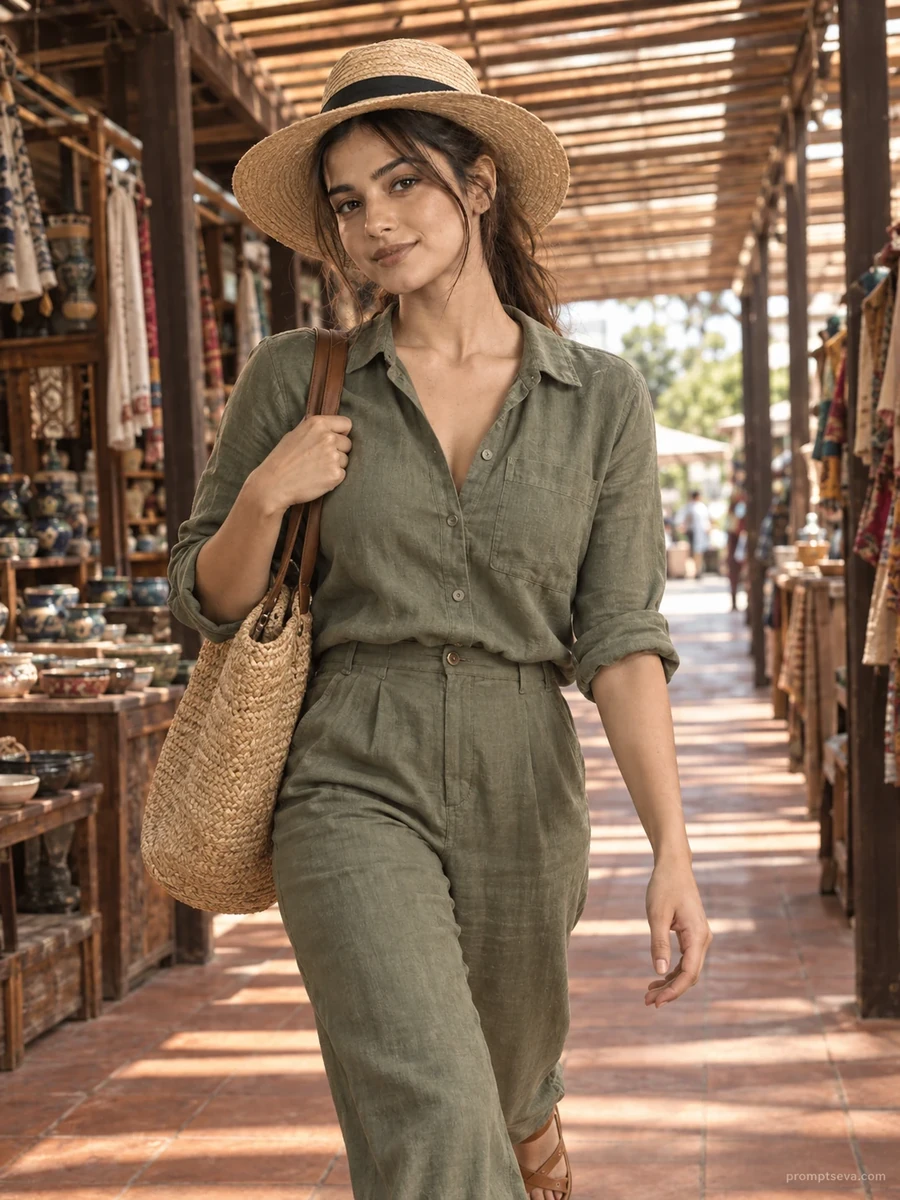
This free market corridor prompt turns your photo into a dynamic, mid-stride walking portrait — a sage-green linen shirt and trouser set, a straw tote and sun hat, moving through a covered market corridor with a wooden slatted canopy overhead. The defining feature of this scene is the light: sunlight filtering through the wooden slats creates alternating bands of warm light and soft shadow across the frame, giving the image texture and movement even before you factor in the walking pose itself.
The setting details matter here too. Terracotta tile flooring, vintage wooden stalls with ceramics and textiles, and a corridor that opens to daylight in the distance all work together to suggest a real, specific place rather than a generic backdrop. The slightly low camera angle adds a subtle sense of motion and presence, making the shot feel candid rather than staged.
How to Use This Prompt
1. Copy the full prompt above. 2. Open ChatGPT, Gemini, or any AI image tool that supports image uploads. 3. Upload one clear, front-facing photo of yourself. 4. Paste the prompt exactly as written and send it. 5. The AI will generate a photorealistic market corridor walking portrait using your actual face. 6. If the motion blur feels excessive or the face looks unclear, add "keep the face sharp and in focus, only slight motion blur on clothing and background."
This prompt works especially well as a "movement" counterpart to the more static courtyard or botanical garden portraits in the same collection — mixing walking and posed shots gives a themed photo set more variety.
Why Face Preservation Matters Here
Walking poses introduce more variables than a static portrait — slight head tilt, motion in the hair, a more candid expression — all of which can give an AI model more room to drift from your actual facial structure. The prompt's facial identity section is written to hold that structure steady even as the rest of the image moves: the bone structure, eyes, nose, lips, and skin tone stay fixed reference points regardless of pose or motion.
If you notice your face losing detail or looking slightly blurred beyond what's needed for the walking motion, add a clarifying instruction like "face must remain fully sharp and clearly recognizable, blur only affects clothing and background." This helps tools that apply motion blur too broadly across the whole subject.
Who This Prompt Works Best For
The market corridor prompt is built for anyone who wants a more candid, storytelling-style image rather than a posed portrait — it works well for travel bloggers, small business or handmade-goods sellers who want a lifestyle shot with a market feel, or anyone building a "day in the life" style content set. The alternating light and shadow bands and mid-stride pose give it a documentary quality that a static portrait can't match, which makes it a good anchor image for a longer caption or story sequence.
It's a poor fit if you need a crisp, clearly-recognizable face as the single focal point — because there's natural walking motion and dappled lighting, fine facial detail reads slightly softer here than in the courtyard or ocean pier prompts. If sharp facial clarity is your top priority, pair this prompt with a more static one from the collection rather than relying on it alone.
Common Mistakes to Avoid
The most frequent issue is uploading a reference photo where the face isn't fully frontal — since this prompt already introduces movement and dappled light, starting with an angled or partially obscured source photo compounds the difficulty and often results in facial features that drift more than intended. Another common mistake is not specifying enough when the canopy's light-and-shadow pattern falls awkwardly across the face in a first attempt; you can and should ask the AI to adjust the shadow position so it doesn't obscure the eyes or nose. Finally, avoid low-light or indoor reference photos — this scene relies on warm, sun-filtered light, and a reference photo shot under cool indoor lighting can create a visible mismatch between your actual coloring and the scene's warm tones.
Tips for Best Results
- Use a clear, front-facing reference photo — walking poses already introduce enough variation, so starting with a strong frontal reference helps keep the face accurate.
- If the lighting bands from the wooden canopy look too artificial, ask for "more natural, uneven light patterns" in a follow-up.
- Try both ChatGPT and Gemini — motion and fabric rendering can differ noticeably between the two.
- For a cleaner final image, specify "no motion blur on the face or hands" if the first generation blurs more than intended.
- If you'd like a different color palette, you can swap "sage-green" for another linen tone while keeping the rest of the scene description the same.